Firm: User Device/Access Checklist
As a best practice recommendation, Firms should review, and have all reps attest/review, all devices and accesses (drives, software, parking cards, mail key, laptops, etc). This not only to ensures there is a control of all accesses, but it assists firms in the case of terminations, or even if hiring someone and wanting to grant them the same access as someone else.
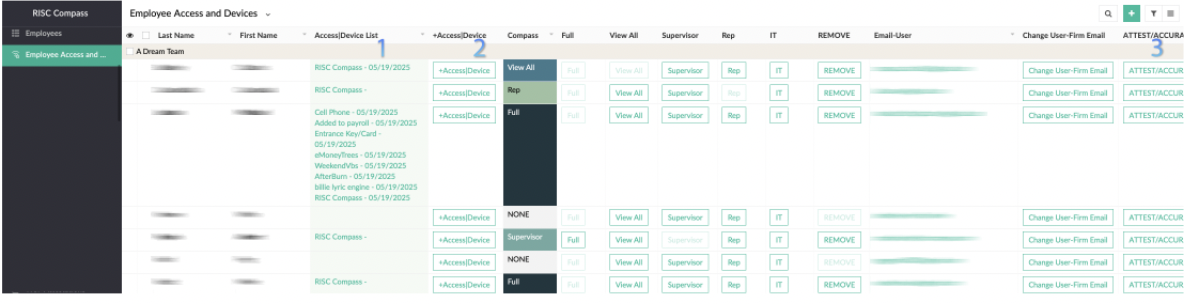
- See list of Devices|Access for each rep. Click to see details, edit, or delete
- ADD any additional device or access
- See list of Devices|Access for each rep. Click to see details, edit, or delete
- ADD any additional device or access
A. Review rep devices and access
3. Attest to the accuracy of the devices|accesses as frequent as desired. (Annually is recommended)
B. Request that Reps review their devices
- Select ALL (or the reps you want reviewed)
- Press "Email Rep to Review" button
- They will receive a PDF copy of their devices/accesses
- Links to the portal where they can attest or add additional devices
B. Reps review
1. Reps can press the +Device|Access button to add any additional devices they are using
2. Reps can attest to the accuracy of their list
Related Articles
Rep: Onboarding Dashboard
Onboarding Portal Map Link to the regulator's site to review record. If BD/RIA, use Finra's FinPro Link to 1) review U-4 info 2) Take CE You must create an account directly with that link. You can reset your password directly if needed. If with the ...Firm: PreHire|New Hire Steps
QUICK STEPS Review Safe Harbor calculation Send email (via Onboarding Dashboard button) to Candidate (or Resend) Candidate completes PreHire Authorization Form + ID request + any Firm PreHire form(s) Firm + Consultant (if selected) receive an email ...Firm: Onboarding
1. Have Rep Sign Agreement with the Firm If Firm uses a generic agreement, it can be added to FIRM INFO and it will auto-send with prehire 2. Set Up Firm Email Ensure it’s being captured Ensure Rep has access 3. Determine the Rep’s Start Date 4. ...Fingerprint Instructions - Electronic for FLORIDA
Only if you are registering with a FLORIDA RIA (BDs and other state RIAs have different instructions) Please use the following instructions to have your fingerprints done at your earliest convenience: 1. Go to www.fieldprintflorida.com 2. Sign up as ...Firm: Command Center Dashboard
Command Center PRINT/Save to PDF the dashboard view of all data Shortcuts to Compass Knowledge Base and Instructions (detailed How-To instructions) Breaks down the number of active (non-terminated) reps the Firm has, by type MY FIRM Middle line is a ...